Read this article with AI
Copy the article text into your chosen tool to inspect its sources and trade-offs.
Identify the login pattern before changing the rule
Credential stuffing, password spraying and a forgotten password can all produce failed sign-ins. They are not the same event. A large number of failures against one account differs from a distributed set of attempts against many accounts, and a successful password check does not establish that the account owner is present.
The OWASP prevention guidance distinguishes those password-related patterns and recommends layered defenses. Avoid reducing the investigation to a single IP address. Keep the account, request timing, authentication result and subsequent session actions available for review.
Before adding a new product, check which events your authentication system records. A useful incident record connects a sign-in attempt to the resulting session without logging passwords or unnecessary secret material. Where an observation is unavailable, record that explicitly.
Strengthen the account authentication boundary
Choose authentication factors and enrollment rules that fit the account’s permissions. Review how customers add or replace a factor and how recovery changes are authorized. A strong normal sign-in can still be undermined by a weak alternate route.
For a hypothetical subscription service, the team might require an additional supported verification step before changing a recovery address or adding a privileged user. That decision protects the sensitive action rather than treating all browsing in the session as equally risky.
The account takeover signals guide expands this action-by-action policy. Risk context should help choose the next check, while the authentication system establishes the credential or session authority.
Place rate controls where they reveal the pattern
| Counting perspective | Useful question | Risk of using it alone |
|---|---|---|
| Account | Is this account receiving unusual attempts? | A broad lockout can prevent the owner from signing in |
| Session or client context | Is the same client repeating a login operation? | Missing or changed context can fragment the sequence |
| Network | Is a source producing abnormal traffic? | Shared networks can contain legitimate customers |
| Route and time window | Is the endpoint under unusual load? | A global restriction can affect unrelated customers |
Inspect these views together. Keep the action resulting from a rate control visible to operations. Support should know whether a customer is waiting for a retry window, completing verification or recovering an account.
Do not publish an internal threshold as a universally correct value. The useful limit depends on the product, authentication design and normal customer behavior. Start with observation and adjust using reviewed outcomes.
Use bot and device evidence as supporting context
A request assessment can help characterize automation. Device or session context can help explain whether a sign-in environment has changed. Neither observation independently proves who is typing the password.
If a vendor returns an account-defense event, ask which business events it needs and what the event means. Trace the assessment through your own response policy. The account takeover tool guide provides a procurement checklist for that wider workflow.
When an edge service also imposes challenges, define how its result reaches the login application. Repeated challenges from uncoordinated layers can make a legitimate recovery process difficult to complete.
Distinguish exposed credentials from an active compromise
A credential-exposure alert concerns information found in a breach or another exposure source. It does not establish that a particular current session is unauthorized. Conversely, the absence of an alert does not establish that a password is safe or that the account is uncompromised.
Use an approved exposure-checking service without sending raw passwords to arbitrary endpoints. Define the remediation for a verified relevant alert and keep the account reference in your own system. The credential exposure article covers that workflow separately.
Rehearse the owner’s recovery
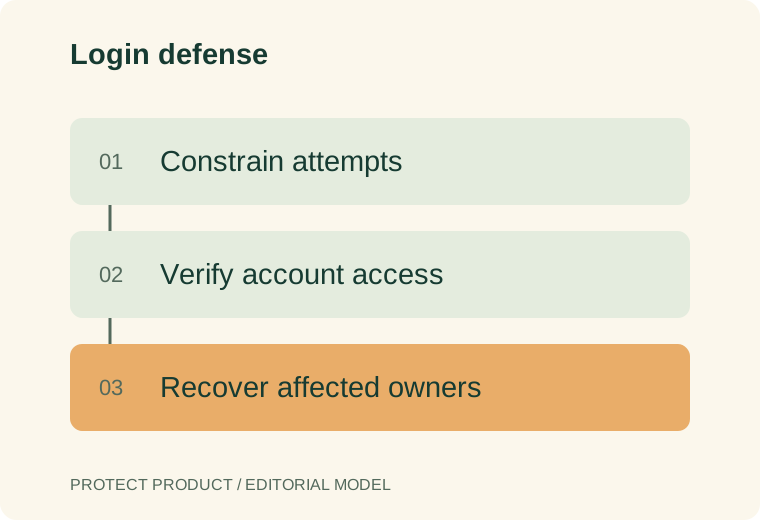
Test an ordinary sign-in failure, an additional verification request, an unavailable risk service and an account restriction. Then walk through the process as a customer who has replaced a phone or lost a factor. Record whether support can resolve the situation without bypassing the intended security boundary.
Measure unauthorized sessions confirmed through investigation, legitimate completion and recovery effort. Also monitor missing evidence and repeated failures caused by an integration change. Alert counts alone do not distinguish successful prevention from a broken login flow.
FAQ
Can credential theft protection software replace login controls?
Exposure monitoring and endpoint protection address different parts of the problem. The application still needs authentication, session handling and a response to suspicious sign-ins.
Should every failed password attempt lock the account?
Choose a policy that considers the attempt pattern and the owner’s recovery path. A restriction triggered by someone else’s attempts can itself deny access to the legitimate customer.
Is a correct password enough to classify a session as trusted?
It confirms the result of that password check. Sensitive actions can require additional authorization or fresher authentication.
Sources
Editorial basis: primary-source documentation and a practical evaluation framework. Examples are hypothetical unless explicitly identified otherwise. This article does not report an independent vendor benchmark.
For evaluation standards and corrections, see our methodology and contact page.